



MOTION PICTURE STUDIO
PRODUCTION TECHNICIANS

  • New Brunswick
  • Nova Scotia
  • Prince Edward Island
ABOUT US

ABOUT US

Learn more about IATSE 849 and its role in the industry.

JOIN LOCAL 849

JOIN LOCAL 849

Review the requirements to become a member of IATSE 849.

PRODUCER LOGIN

PRODUCER LOGIN

Database of crew member information for producers.

Accessing Availability Lists

Availability lists are a great way to see member details, what shows they're working on, and if they're available. This list is different from the Daily Hire List, which is updated from the availability you've set in the "My Availability" tab in your profile. This list is generated from whatever deal memo or crew lists we've received from IATSE Local 849 signatory projects. These Availability lists are only accessible to Members or Producers, but will include Referrals and Sister Members on the Overhire Availability lists.

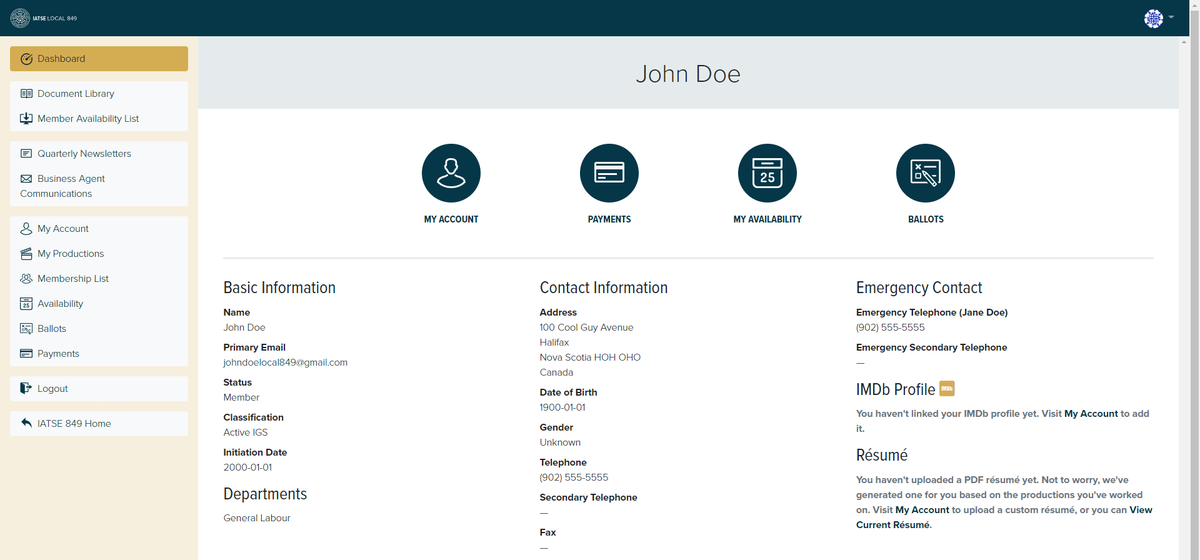
1. Login to your Member Profile
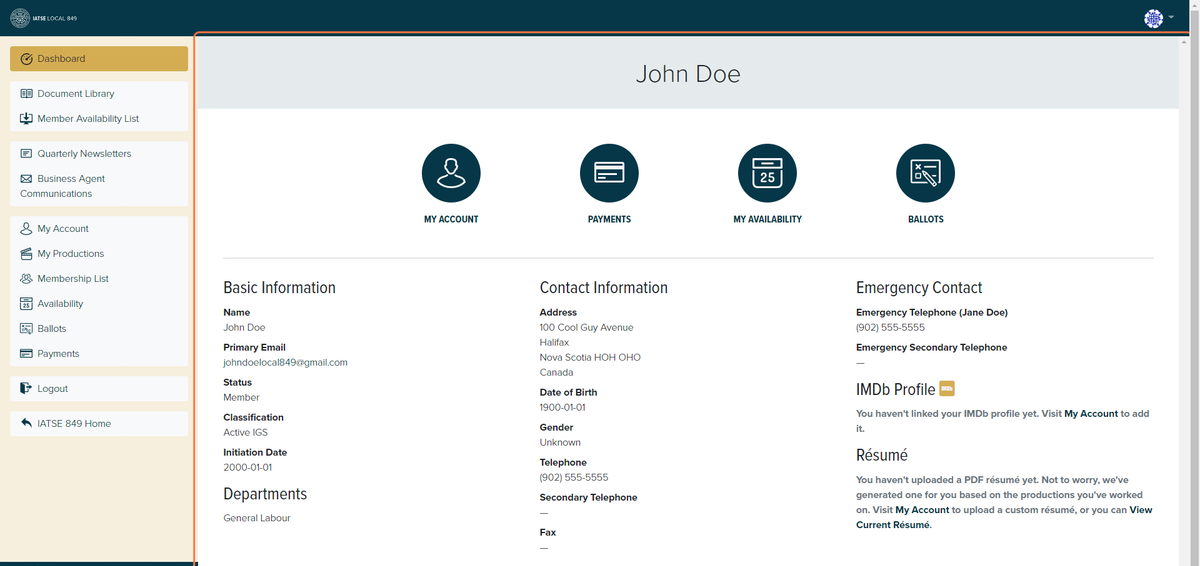
 

2. Click on "Member Availability List"


3. Decide what department(s) you would like an Availability List for. For each department, you can see people who are classified as full members in that department OR people who are on the overhire list for that department. You can pick more than one department and classification for each Availability List.


4. If you'd like an Availability List for all departments, leave the box blank.
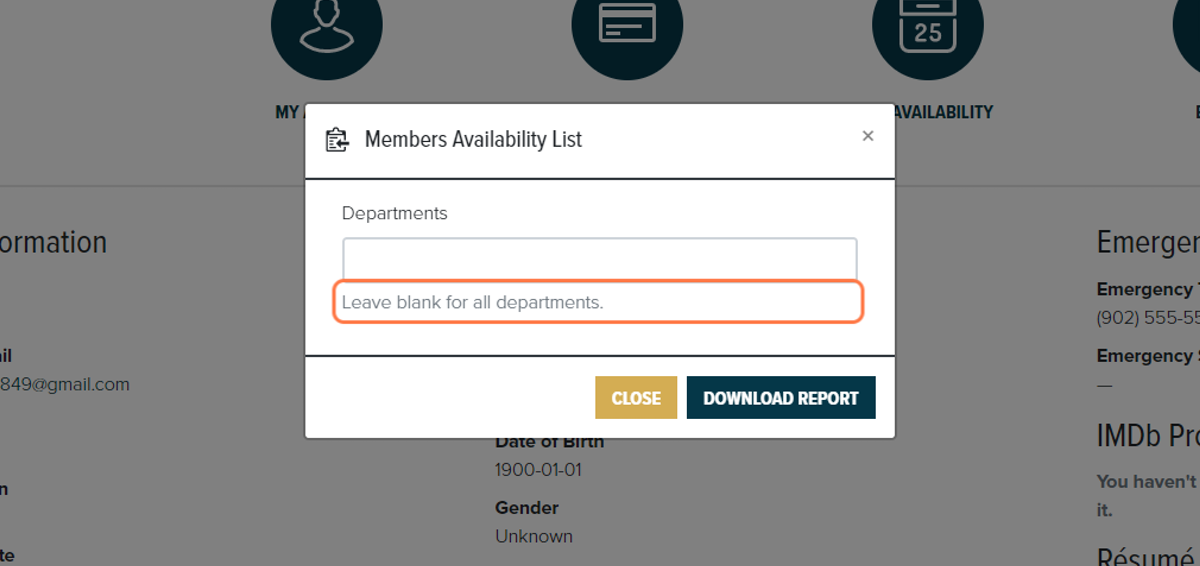
 

5. Once you've selected the department(s) you'd like an Availability List for, click "Download Report".

6. In another window, your Availability List will be viewable and downloadable! Enjoy!
Upload or Update your Resume

Keeping an up-to-date resume on file ensures that Keys or Producers that are looking for workers have the most accurate reflection of your skills and experience. If you're unsure if your resume is appropriate for the film industry, please refer to our resume guide. Please ensure that your resume is in PDF format.

How to Upload Your Resume

1. Login to your Member Profile


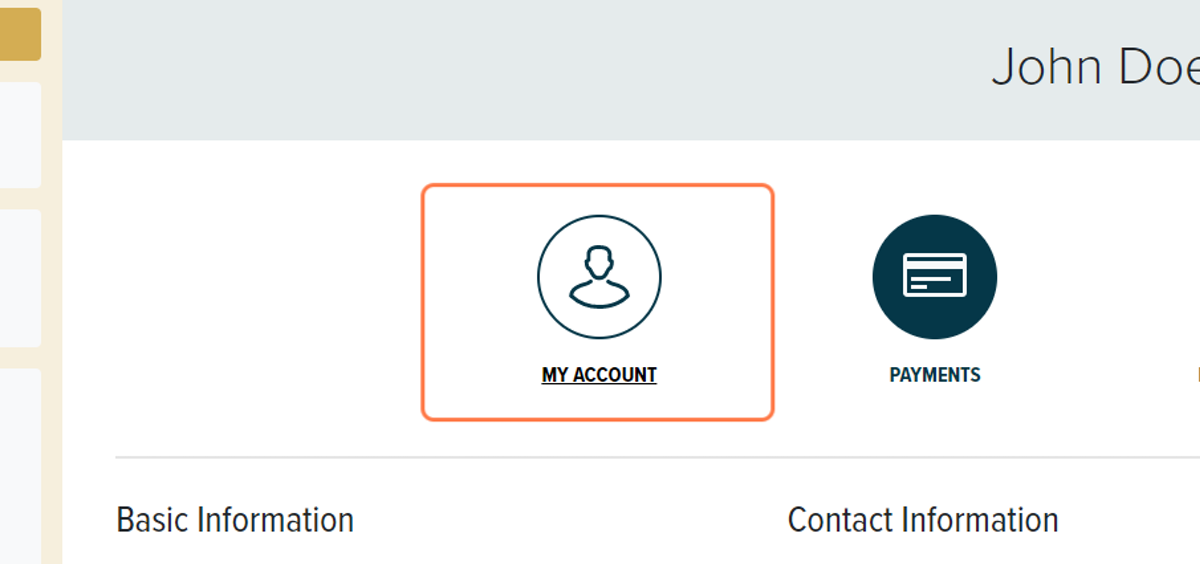
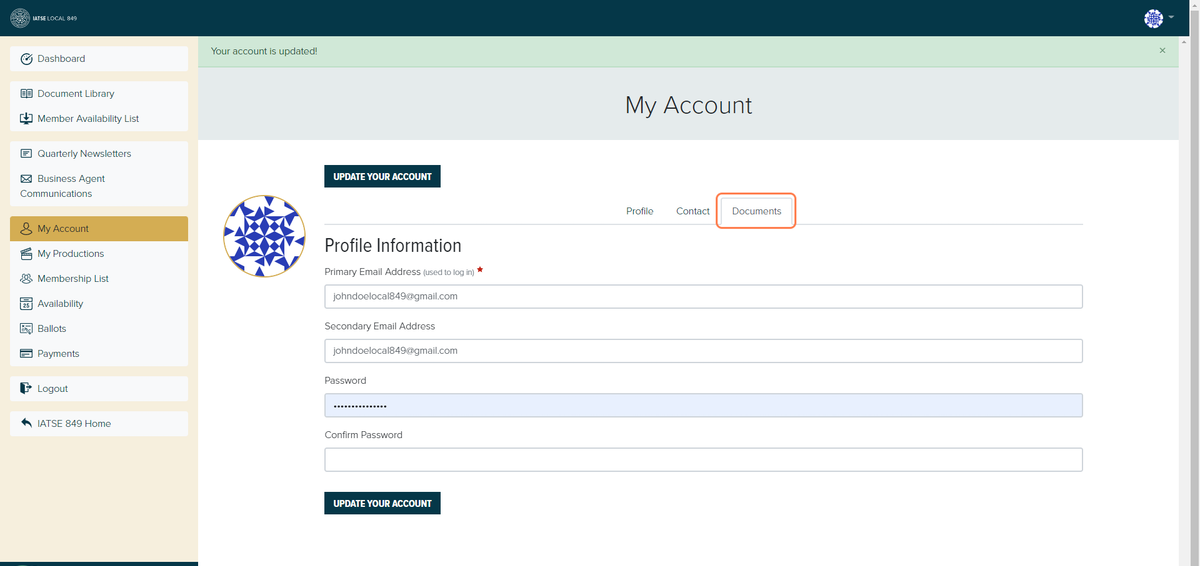
2. Click on "My Account"


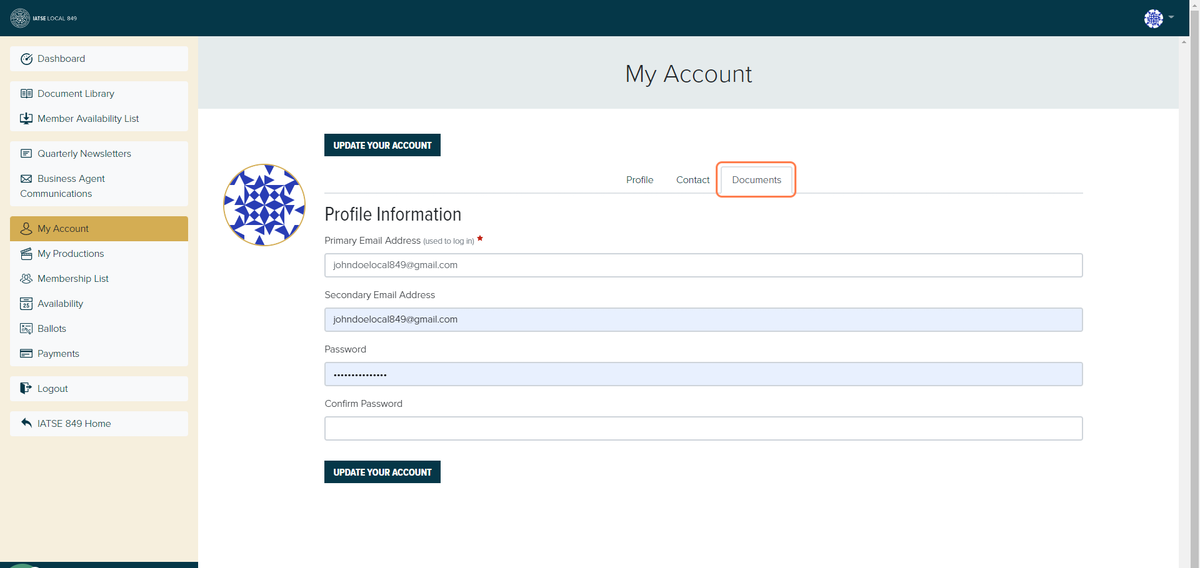
3. You will automatically be brought to the "Profile" tab. Click on the "Documents" tab.


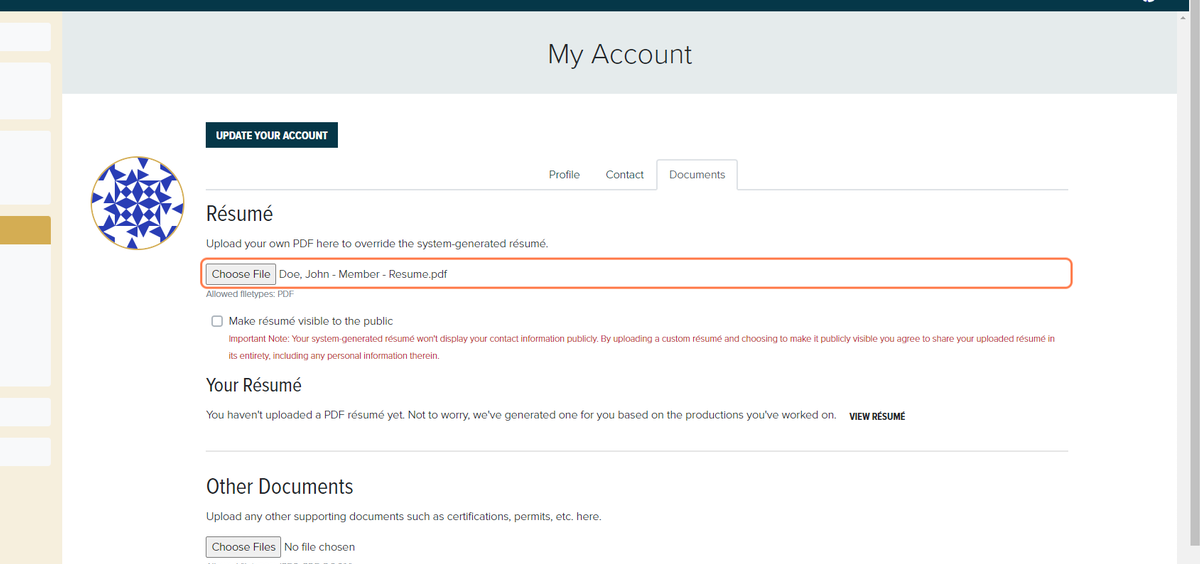
4. Click on "Choose File" and upload your resume. Your resume must be in PDF format.


5. Notice that after choosing your resume file, the page will still say "You haven't uploaded a PDF resume yet". This is because you still need to "Update Your Account". To update your account, click on the 'Profile" tab.


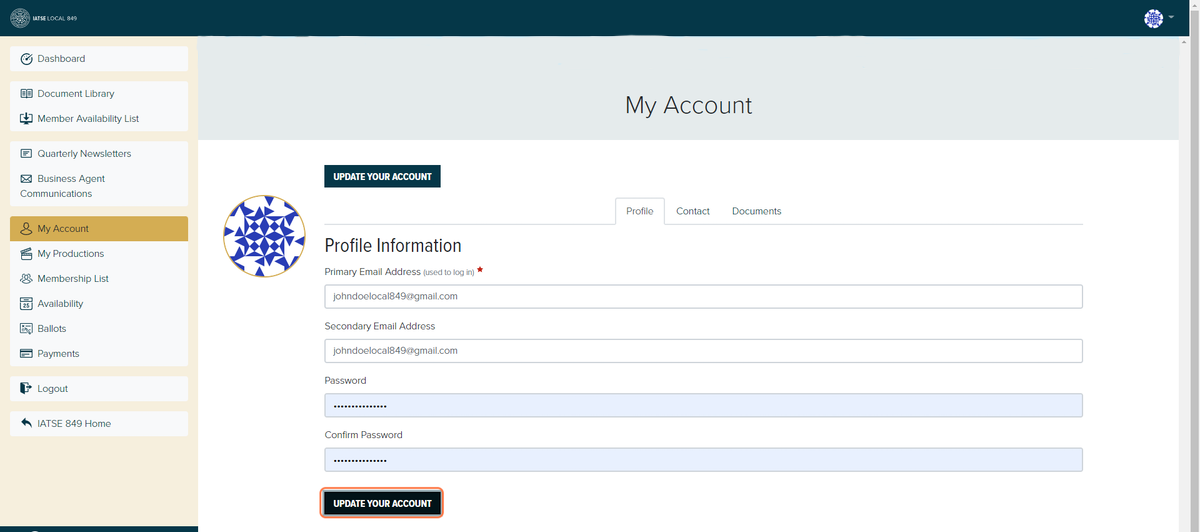
6. Once you're on the "Profile" tab, enter your email and password; enter you password once in the "Password" section and a second time in the "Confirm Password" section. Then click on "Update Your Account".


7. Notice that the green banner above says "Your account is updated!". To double check that your resume has been uploaded successfully, click on the "Documents tab.


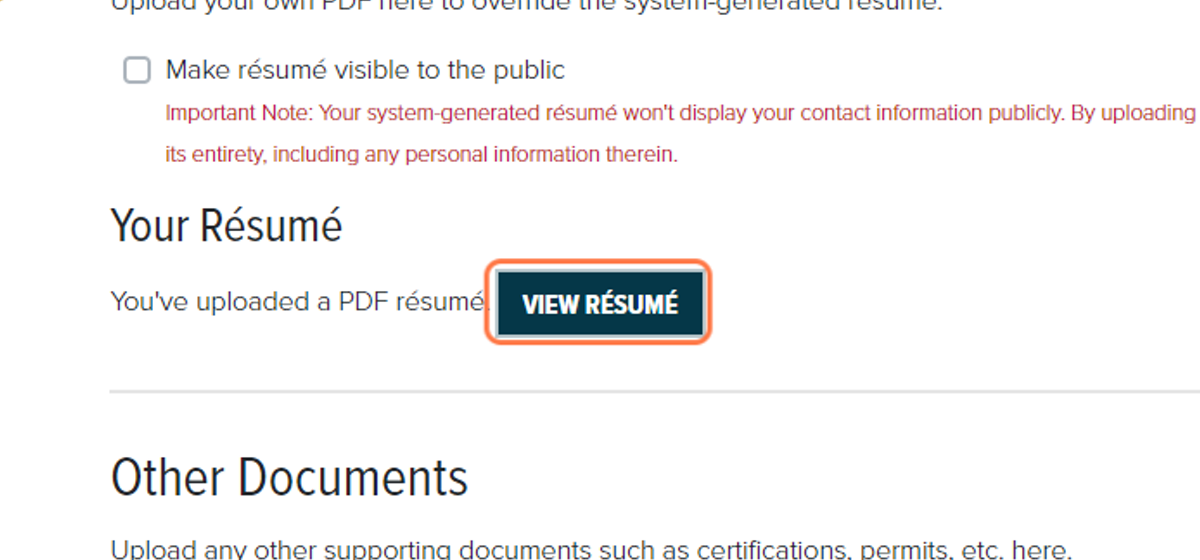
8. Once in the "Documents" tab, notice that the page now says "You've uploaded a PDF resume".


9. To review your current resume, click "Your Resume". This will open your resume in a separate tab.


_________________________________________________________________________

How to Update Your Resume

1. Similar to the steps above, navigate to the "Documents" tab under "My Account"


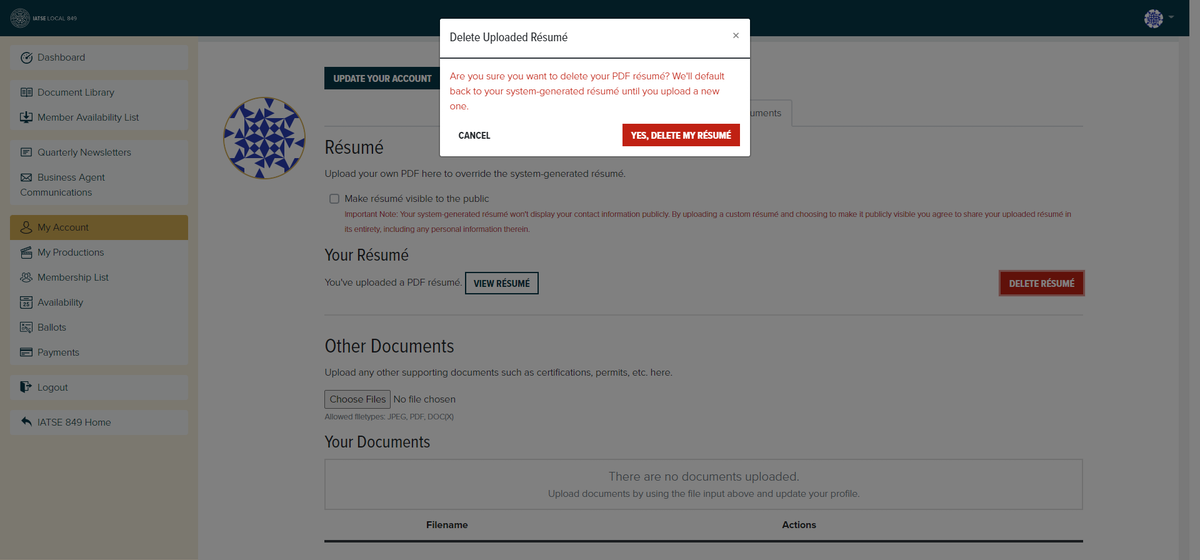
2. Click on "Delete Resume" and then "Yes, Delete My Resume".


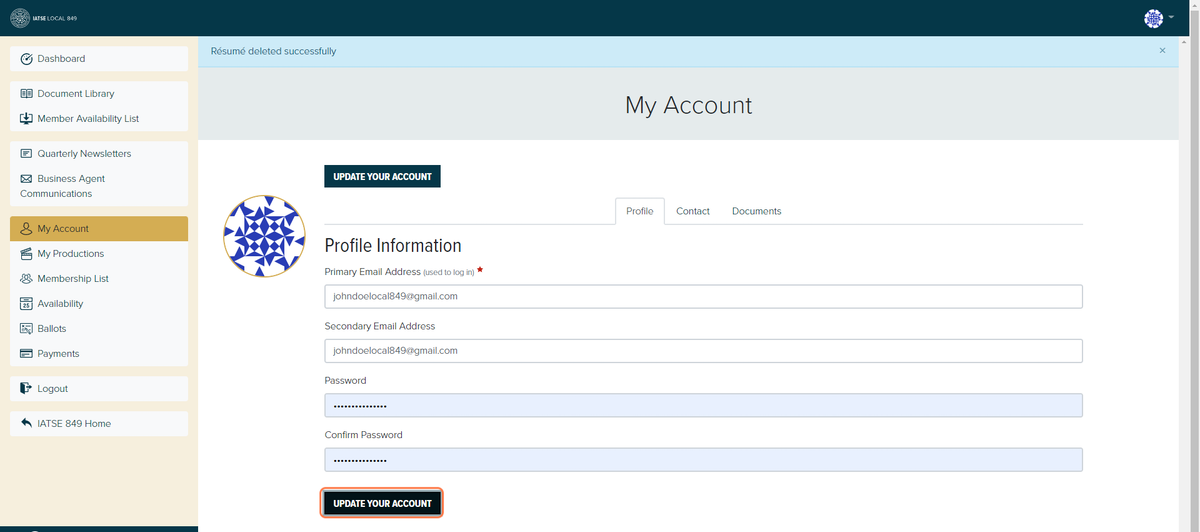
3. Notice the banner that says "Resume deleted successfully". Go back to the "Documents" tab.


4. You will no longer have a resume on file. Follow the steps above to upload a new resume.


How to Vote on a Membership Ballot

In order to gain membership into IATSE Local 849, you must be voted in by the membership. Once you are a full member, you are able to vote on those Membership Ballots. Once a ballot is sent out to the membership via email, you can either access it from the link in the email or through your Member Profile.

1. Login to your Member Profile.


2. Click on "Ballots".


3. You will be brought to the "Ballots" page.


4. When you're ready, click on "Place Your Vote".


5. Welcome to the Membership Ballot! These are people that are applying for membership. You can see their name, what department they're applying in, their experience, how many hours they have proved they've worked, and who they received recommendation letters from.


6. You can vote Yes, Abstain, or No for each applicant.


7. Once you've made your decisions, click "Submit" to cast your votes.


8. After you've pressed "Submit" you should be brought to this page that says "Thank you for your vote!". Congratulations, you've voted in your first Membership Ballot!

Setting Your Availability

By setting your availability, you will appear on the Daily Hire List that is dispatched to Keys on different shows. This list will make your contact information and credentials available to members who are hiring or need daily workers. Referrals, Sister Members, and Full Members can set their availability.

1. Login to your
Member Profile.


2. Click on "My Availability".


3. Here you can indicate your availability for up to a week in advance. If you require transportation, be sure to check the "Requires Transportation" box.
4. Once you're ready to submit your availability, click "Save Changes".


5. Your availability has been updated! You will now show up on the Daily Hire List when you've indicated your availability.

Checking the Balance of your Medical Dollar Bank

At any time, as a member, you can log in to your Union Benefits Profile to see how much your Medical Dollar Bank has left in it to pay for your medical plan. Details on the medical plan and how that works can be found here. At any time, if you have questions, please contact either Union Benefits or IATSE Local 849 

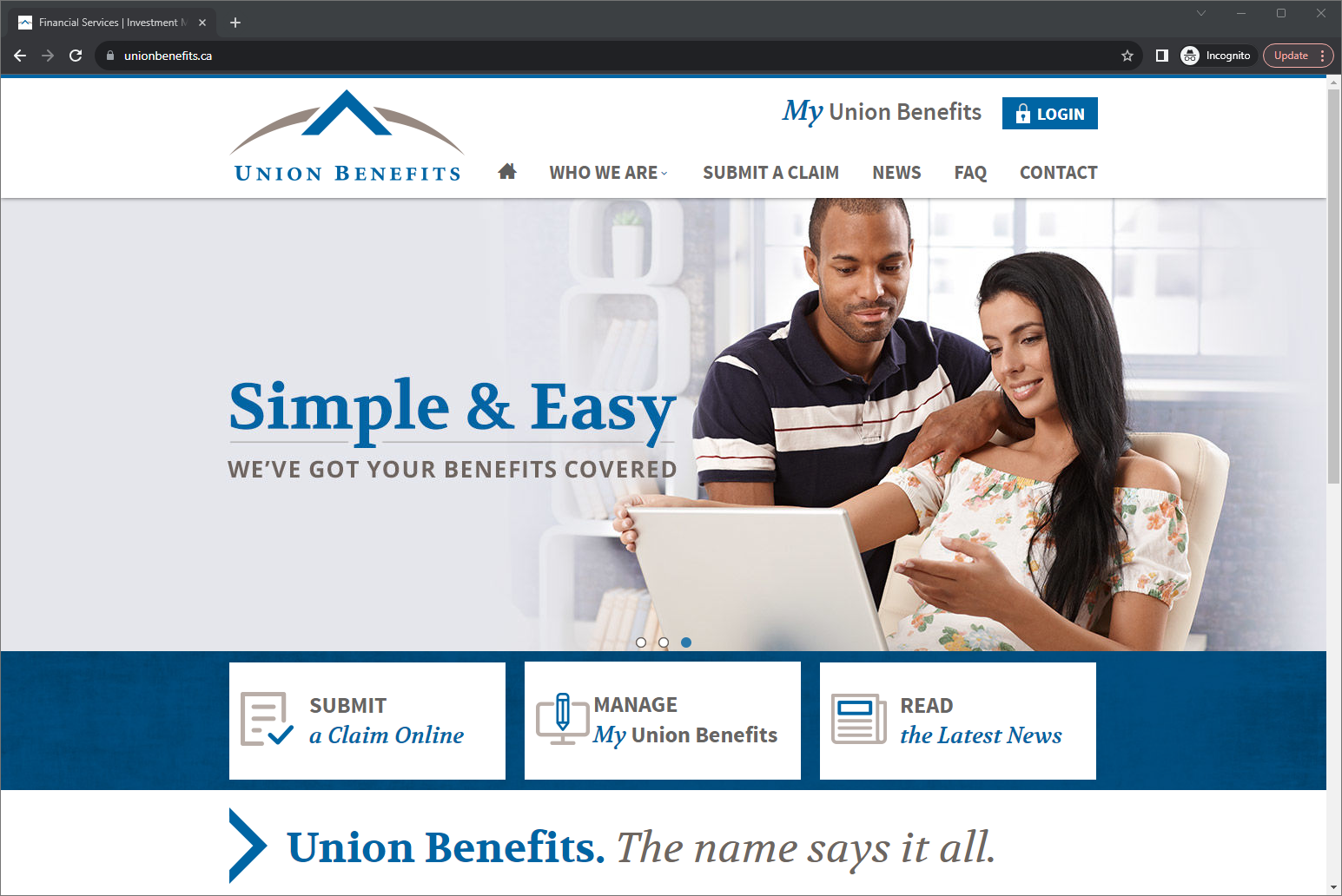
1. Navigate to the Union Benefits Website 
Step 1


2. Click on "LOGIN" in the upper right-hand side.
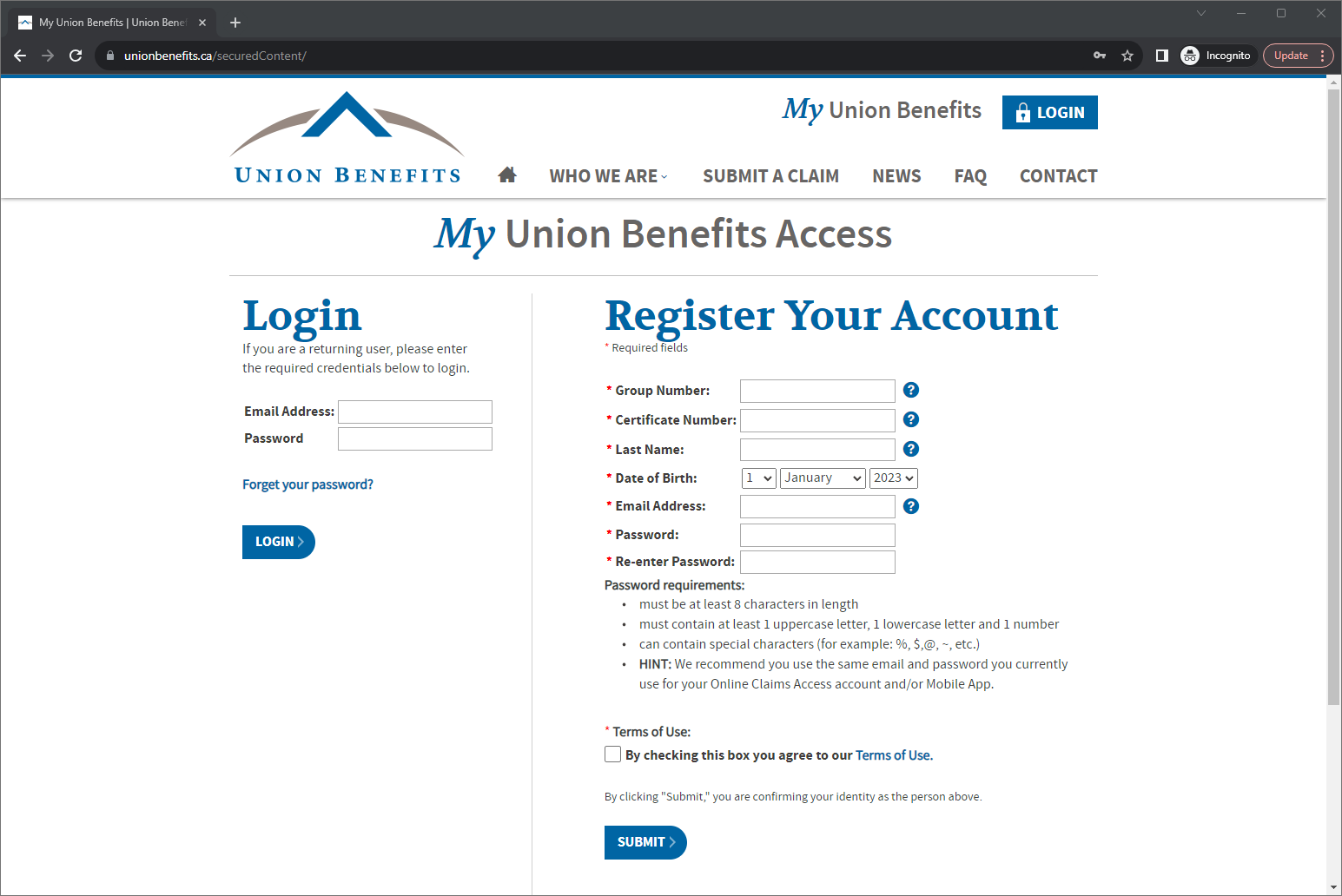
Step 1 1


3. Either login to your existing account, or register for a new one. If you need to register for an account and have not logged in before, please use the information on the white Union Benefits card you received in the mail. If you are missing information or you are unable to log in, please call Union Benefits directly at 1-800-265-2568.

Step 2

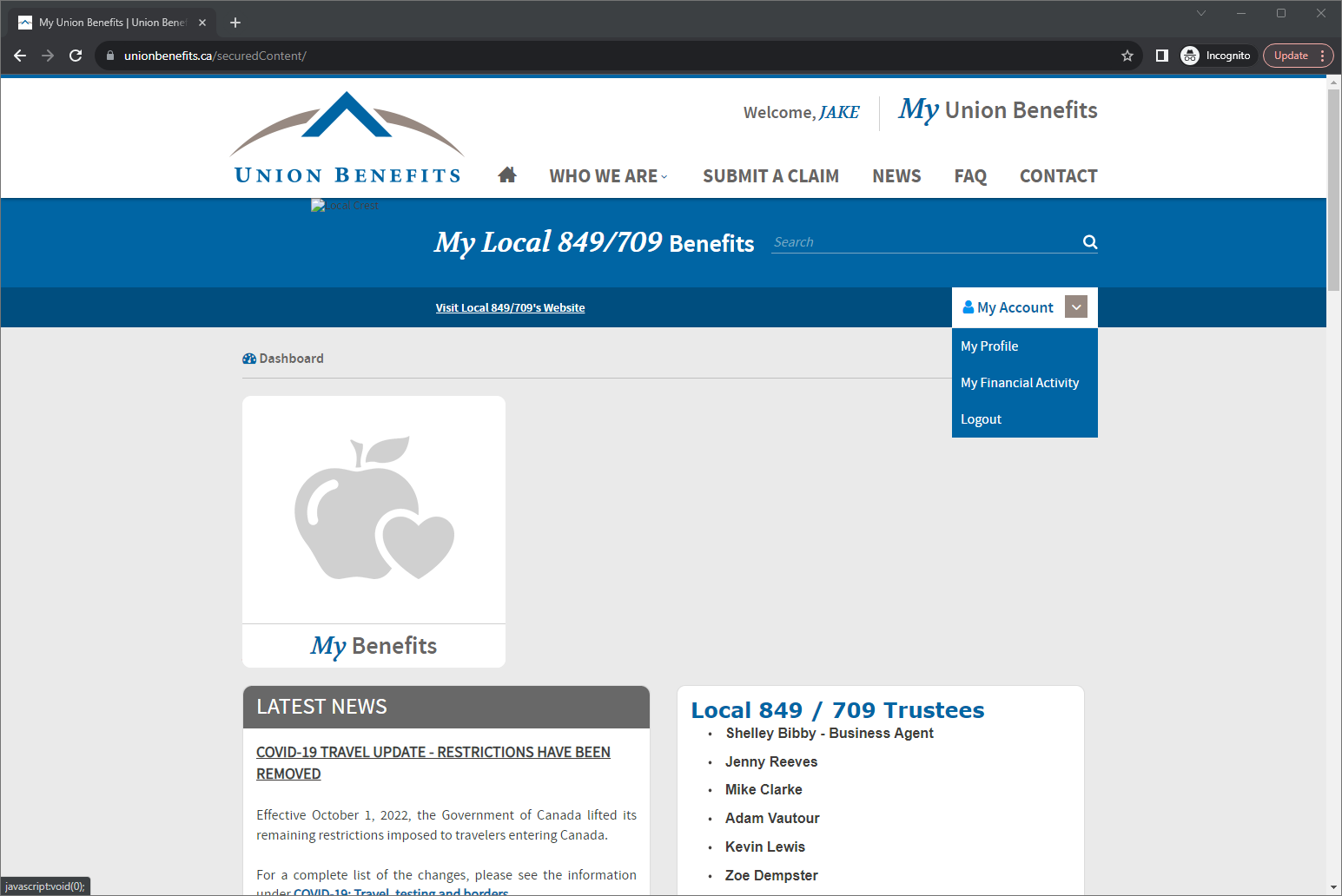
4. Once you've logged in, click on the "My Account" drop-down on the right-hand side.

5. Click on "My Financial Activity" to see the current balance of your medical dollar bank and a history of contributions, payments, and deductions relating to your medical dollar bank.

Additionally, once logged in, under the "My Account" tab, you can click on "My Profile" to see an overview of your beneficiaries for your life insurance policy. If you would like to update your beneficiaries, please contact either Union Benefits or IATSE Local 849 

The Lighthouse
Diggstown
From
Book Of Negroes
The Sinner
Mr. D
IATSE Local 849

 
Website design by Guild Software

Phone: 902-425-2739
Toll-Free: 1-877-425-2741

E-mail: admin@iatse849.com


1-617 Windmill Road, 2nd Floor
Dartmouth, Nova Scotia B3B 1B6

Hours of Operation
Monday-Friday - 9:00am-5:00pm AT
Saturday-Sunday - Closed